v0.5.0 — DevTools, one-command deploy, 7 frameworks

Build and deploy
agentic apps.

Single agents or multi-agent pipelines — with real-time DevTools, Streamlit chat UI, and one-command deploy to Docker or Fly.io. Any framework. Any model.

Live DevToolsOne-command deploy7 frameworksMulti-agent pipelinesFastAPI + StreamlitDocker · Fly.io · AWS · GCP
$npx agentvoy create my-project
Create project →
Chat + DevTools — split view

Deploy your agentic app to

Docker
Fly.io
Railway
GCP
AWS
Frameworks

One CLI. Any framework.

Pick your stack. AgentVoy generates the right boilerplate for each framework automatically.

OpenAI Agents SDK
Python
Available
Google ADK
Python
Available
CrewAI
Python
Available
LangGraph
Python
Available
Anthropic SDK
Python
Available
LlamaIndex
Python
Available
AutoGen
Python
Available
Model Providers

Any model. Bring your key.

OpenAI, Anthropic, Google, Groq, Mistral — or run fully local with Ollama. No GPU required.

OpenAI
GPT-4o, o1
Anthropic
Claude Sonnet 4, Opus 4
Google
Gemini 2.0 Flash
Ollama
llama3, mistral (local)
Groq
llama-3.3-70b
Mistral
mistral-large
DevTools

See your agent think.

Every app-mode project includes a real-time DevTools dashboard. Start with agentvoy dev and open /dev.

Creating a project with Anthropic SDK
agentvoy dev

Starts your agent server with hot-reload, opens the DevTools dashboard, and streams trace events via WebSocket. Zero config needed.

$ agentvoy dev
API Endpoints
GET/devDevTools dashboard
WS/ws/traceReal-time trace stream
GET/dev/eventsAll events as JSON
POST/runRun your agent
GET/healthHealth check
Dynamic model switching

The Streamlit chat UI auto-detects API keys from .env and shows available models — GPT-4o, Claude Sonnet, Gemini Flash, and more. Switch models on the fly without restarting.

agent.guard.yml

Guardrails built in,
not bolted on.

Every AgentVoy project ships with agent.guard.yml — a universal declarative config for permissions, cost limits, and behavior constraints. One format that works across every framework. Enforced at runtime by agentvoy-guard — automatically included in every project.

🔒
Network permissions
Allowlist/denylist domains your agent can reach
💰
Cost limits
Hard cap spend per run — never get a surprise bill
🔁
Iteration caps
Set max tool calls and loop iterations
🛡️
Prompt injection blocking
Detect and block prompt injection attacks
👁️
PII detection
Warn or block when sensitive data is present
agent.guard.yml
# Universal guardrails — works across all frameworks
version: "1.0"

model:
  provider: anthropic
  model: claude-sonnet-4-20250514

permissions:
  network:
    mode: restricted
    allow: ["*.github.com"]
  execution:
    allow_shell: false

guardrails:
  input:
    block_prompt_injection: true
    pii_detection: warn
  behavior:
    max_iterations: 20
    cost_limit: "$1.00"
    timeout: 5m
Why AgentVoy

Everything you need to ship agents.

From zero to production-ready agent project in one command.

Two paths, one command
Build a local agent for experimentation, or a full deployable app with FastAPI server, Streamlit chat UI, DevTools dashboard, and cloud configs — all from npx agentvoy create.
🔬
Live DevTools
Real-time agent tracing via WebSocket. See every LLM call, tool invocation, guard check, and pipeline stage as it happens — with a dark-themed dashboard at /dev.
🚀
One-command deploy
agentvoy deploy --target docker builds and runs your container. agentvoy deploy --target fly-io deploys to the cloud. Secrets, configs, and health checks handled automatically.
🔒
Secure by default
Every project ships with agent.guard.yml. Permissions, cost caps, iteration limits, prompt injection blocking — enforced before you write a line of agent logic.
🔌
Any framework. Any model.
OpenAI, Google ADK, CrewAI, LangGraph, Anthropic, LlamaIndex, AutoGen. Switch models on the fly from the chat UI — no restart needed.
🤖
Multi-agent pipelines
Build sequential pipelines where each agent builds on the previous stage. Name your agents, and get a production-ready pipeline with real-time stage visualization.
Deploy

One command. Deploy anywhere.

agentvoy deploy builds, configures, and ships your agent. Your agent.guard.yml guardrails flow directly into infrastructure config.

agent.guard.yml → cloud config
behavior.timeout: 5mDocker HEALTHCHECK, Cloud Run timeout
behavior.cost_limit: $1.00Container memory: 512Mi
execution.allow_shell: falseNon-root Docker user
🐳Docker

Builds the image, runs the container, exposes API + DevTools

+ Dockerfile
+ .dockerignore
+ docker-compose.yml
$ agentvoy deploy --target docker
✈️Fly.io

Checks auth, sets secrets from .env, deploys via flyctl

+ deploy/fly.toml
$ agentvoy deploy --target fly-io
🚂Railway

Generates railway.json config for one-click deploy

+ deploy/railway.json
$ agentvoy deploy --target railway
☁️GCP Cloud Run

Generates Cloud Run service config with health checks

+ deploy/cloud-run.yaml
$ agentvoy deploy --target gcp-cloud-run
λAWS Lambda

SAM template + Lambda handler for serverless deploy

+ deploy/template.yaml
+ deploy/lambda_handler.py
$ agentvoy deploy --target aws-lambda
Existing project?

Add deployment to any existing agent project — generates server.py, DevTools, and all deployment files without touching your agent code.

$ agentvoy deploy --target docker
Quick Start

Up and running in 60 seconds.

No installation required. Choose your path — local agent or deployable app.
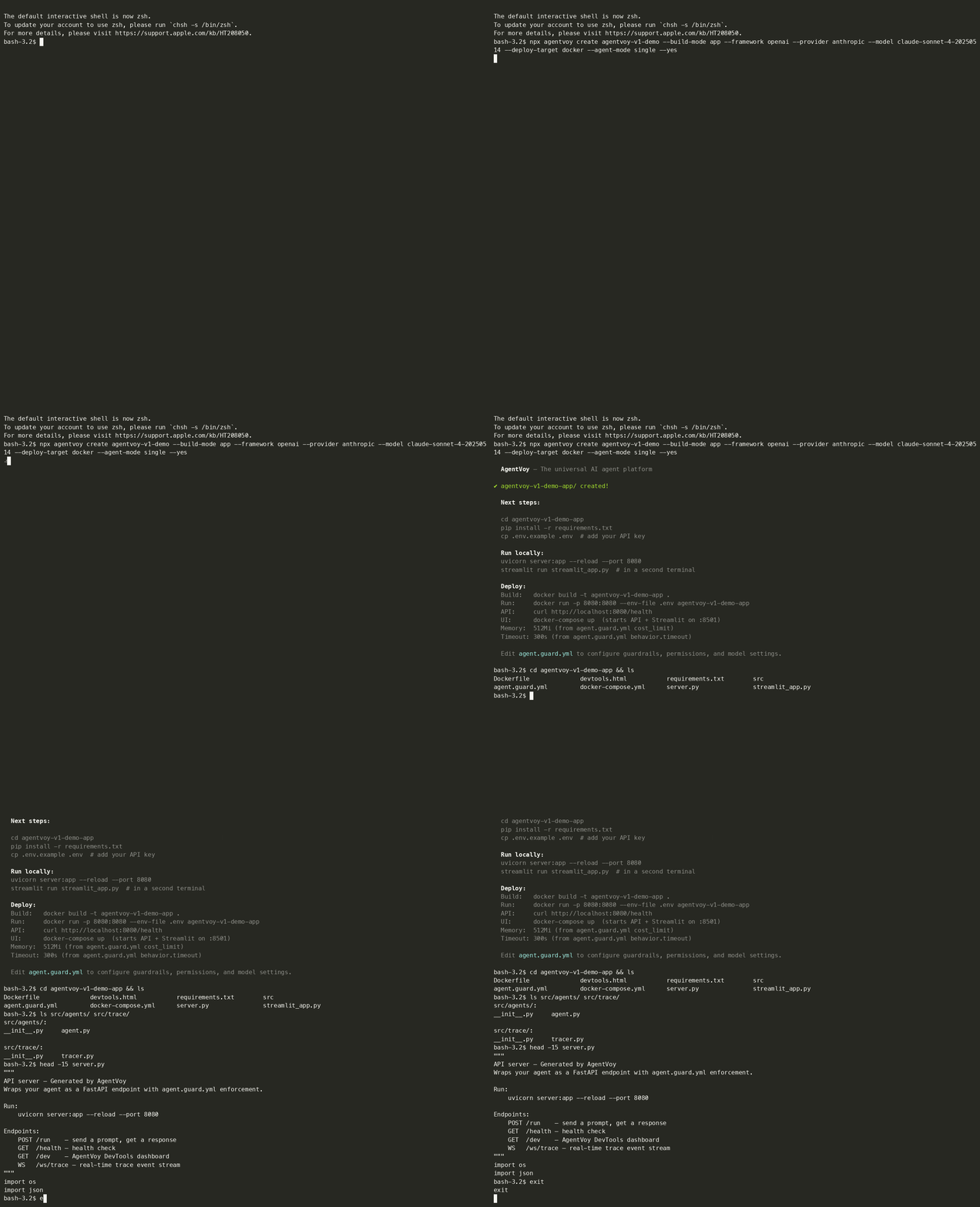
npx agentvoy create
AgentVoy CLI demo — scaffold a project in seconds
Path ALocal Agent
1
Create your agent project
Run the command, pick your framework and model interactively — or pass flags to skip all prompts.
$ npx agentvoy create my-project --yes
2
Add your API key
Copy .env.example to .env and add your key. Supports OpenAI, Anthropic, Google, Groq, Mistral, and local Ollama.
$ cp .env.example .env
3
Install and run
Install Python dependencies and start your agent. The interactive REPL is ready immediately.
$ pip install -r requirements.txt && python run.py
4
Configure guardrails
Edit agent.guard.yml to set permissions, cost limits, and behavior constraints.
$ # Edit agent.guard.yml
Path BDeployable App
1
Create a deployable app
Choose App mode to get a FastAPI server, Streamlit chat UI, DevTools dashboard, Dockerfile, and cloud configs.
$ npx agentvoy create my-project --build-mode app --yes
2
Add your API key and install
Copy .env.example to .env. Install Python deps — includes FastAPI, Uvicorn, Streamlit, and websockets.
$ cp .env.example .env && pip install -r requirements.txt
3
Start with DevTools
Launch the dev server with live tracing. DevTools dashboard opens at /dev — see every LLM call, tool use, and guard check in real time.
$ agentvoy dev
4
Deploy
One command to build and run with Docker, or deploy to Fly.io. Secrets and health checks handled automatically.
$ agentvoy deploy --target docker

Start building your agent.

One command. Any framework. Deploy anywhere.

$npx agentvoy create my-project
Create visually →GitHub →